

If you’ve followed Review Junkies for a while, you already know we’ve been keeping tabs on FlexClip for years. From its early days as a simple drag-and-drop video editor to its evolution into an AI-powered creative suite, FlexClip has consistently leveled up its game. And just when I thought the platform couldn’t get any more accessible or user-friendly, FlexClip introduced two brand-new features that completely blew me away: AI Recreate and Auto Edit.
These tools aren’t just “cool additions” — they’re huge leaps forward that feel like they were designed for people like me: someone who loves making content but doesn’t always have the time, ideas, or energy to polish everything manually. Below is my experience testing these new features and why they might just be the shortcuts every creator needs right now. Additionally; make sure to check out flexclip.com/ai-video-magic for more information.
First Impressions: FlexClip Just Keeps Getting Better
Before diving into each feature, I need to say this: watching FlexClip grow has been impressive. It reminds me of watching a kid you babysat suddenly graduate college.
I remember using FlexClip years ago to create a quick promo for a charity event. Back then, I manually dragged clips around, added text box by text box, and spent way too long adjusting timing. Today? Their AI tools practically do half the work before I even get my coffee.
FlexClip hasn’t just added features—they’ve added the right features, ones that actually solve creator headaches. And these two new tools prove it.
AI Recreate – Your New Secret Weapon for Fast Video Creation

What AI Recreate Does
AI Recreate feels like hiring a skilled video editor who already knows your style… without actually hiring anyone.
Here’s what sets it apart:
- You pick any template — business promo, travel vlog, birthday montage, whatever.
- Upload your files.
- AI analyzes your content and intelligently matches it with the template.
- It automatically adds captions, aligns your clips, and structures the video.
- You get a complete, polished draft in seconds.
The first time I used AI Recreate, I actually laughed out loud at how fast it worked. I chose a travel reel template and dropped in footage from a recent family trip. In less than 20 seconds — I’m not exaggerating — FlexClip had created a full video complete with transitions, captions, and fitting background music. It felt like magic.

Fine-Tuning Made Easy
Of course, no AI tool is perfect right out of the box. What I appreciated most is that AI Recreate doesn’t trap you inside a rigid template. Once it builds the video, you can tweak anything:
- Replace clips
- Change colors
- Edit captions
- Swap music
- Adjust timing
This gives you the best of both worlds: speed and control. I ended up adjusting clip order and swapping the music to something a little more upbeat — but the heavy lifting was already done for me.
Thousands of Templates = Endless Possibilities
Whether you’re making:
✓ A product promo
✓ A birthday greeting
✓ A real estate showcase
✓ A social media teaser
✓ A wedding montage
AI Recreate can get you 80% of the way there instantly. As someone who juggles multiple projects, that 80% head start is priceless. I’ve honestly used AI Recreate at least 5 times before write this review to get ahead of some projects I’ve been working on.
Auto Edit – AI Editing for People With Zero Time
What Auto Edit Does
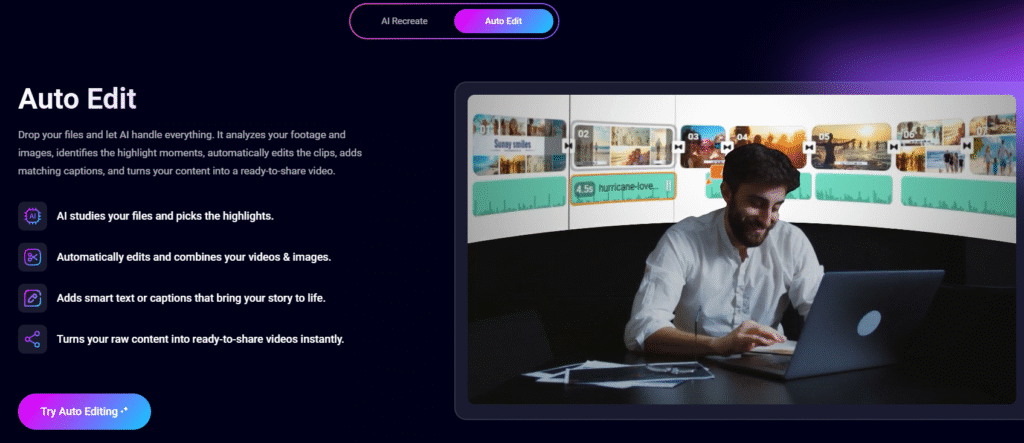
If AI Recreate is your virtual video editor, Auto Edit is your virtual content curator. This tool lets you drop in raw footage — even hours of it — and the AI analyzes everything to pick out the highlight moments. Used properly, this feature saves so much time it almost feels unfair.
Here’s the breakdown:
- Upload your clips or photos
- AI finds the best parts automatically
- It cuts them together smoothly
- Adds transitions and pacing
- Creates captions based on context
- Gives you a ready-to-share video
My Experience Using Auto Edit

I tested Auto Edit using footage I shot at a charity event. Normally, sorting through long, shaky clips is my least favorite part of video editing. It’s like doing laundry — necessary, but painfully boring. Auto Edit changed that.
The AI not only selected the best moments but also ignored the accidental shots of my shoes and the blurry clips I didn’t even realize I captured. It even added captions that matched the vibe of the video without me typing a single word. This feature alone feels like something that should cost extra — but it’s available right inside FlexClip’s regular editor.
Who These Tools Are Perfect For
✓ Content creators
Your workflow just got 10x faster.
✓ Business owners
You can now make promo videos without hiring an editor.
✓ Teachers / coaches
Turn raw class clips into lesson highlights instantly.
✓ Parents
Create beautiful family montages without spending hours learning editing.
✓ Beginners
No experience needed — the AI handles the hard parts.
Final Thoughts — FlexClip Just Leveled Up
After testing both AI Recreate and Auto Edit, I can confidently say FlexClip is no longer just an “easy video editor.” It’s becoming an essential tool for anyone who needs high-quality videos without spending hours crafting them.
Do these tools replace traditional editors?
Not exactly — but they get you extremely close, extremely fast.
Do they save time, stress, and creative energy?
Absolutely.
And as someone who’s used dozens of editors over the years, FlexClip’s new features are honestly some of the most helpful I’ve seen. FlexClip has grown a lot since we first reviewed it years ago…and somehow, it’s still getting better.
